Powering Connected Data: Building Applications with Spring Boot, Neo4j and Spring Data Neo4j
Building Graph Applications with Spring Boot, Neo4j and Spring Data Neo4j

Overview
In today's interconnected world, applications increasingly deal with complex relationships between data entities. While traditional relational databases excel at structured data, they often struggle with the inherent "connectedness" of real-world scenarios. This is where graph databases, such as Neo4j, shine, offering a powerful and intuitive way to model, store, and query relationships.
For Java developers leveraging the Spring ecosystem, the combination of Spring Boot, Neo4j, and Spring Data Neo4j provides a seamless and highly productive environment for building robust, graph-driven applications. This article explores the synergies of these technologies and guides you through the process of harnessing their power.
Building a Spring Boot Neo4j Application: A Practical Overview
Let’s begin creating a Spring Boot application to demonstrate the capabilities of Neo4j in storing and querying data as nodes and relationships. For this application, let’s consider the Store-Franchise use case.
Project Setup
Add the required dependencies to the springboot application
pom.xml
<?xml version="1.0" encoding="UTF-8"?>
<project xmlns="http://maven.apache.org/POM/4.0.0"
         xmlns:xsi="http://www.w3.org/2001/XMLSchema-instance"
         xsi:schemaLocation="http://maven.apache.org/POM/4.0.0 http://maven.apache.org/xsd/maven-4.0.0.xsd">
    <modelVersion>4.0.0</modelVersion>

    <parent>
        <groupId>org.springframework.boot</groupId>
        <artifactId>spring-boot-starter-parent</artifactId>
        <version>3.4.0</version>
        <relativePath/> <!-- lookup parent from repository -->
    </parent>

    <groupId>com.test.graph</groupId>
    <artifactId>graph-neo4j</artifactId>
    <version>1.0-SNAPSHOT</version>

    <properties>
        <maven.compiler.source>17</maven.compiler.source>
        <maven.compiler.target>17</maven.compiler.target>
        <project.build.sourceEncoding>UTF-   8</project.build.sourceEncoding>
    </properties>

    <dependencies>
        <dependency>
            <groupId>org.projectlombok</groupId>
            <artifactId>lombok</artifactId>
            <optional>true</optional>
        </dependency>
        <dependency>
            <groupId>org.springframework.boot</groupId>
            <artifactId>spring-boot-starter-data-neo4j</artifactId>
        </dependency>
        <dependency>
            <groupId>org.springframework.boot</groupId>
            <artifactId>spring-boot-starter-validation</artifactId>
        </dependency>
        <dependency>
            <groupId>org.springframework.boot</groupId>
            <artifactId>spring-boot-starter-web</artifactId>
        </dependency>
    </dependencies>
</project>
Configuration
Add the required configurations for Spring Data Neo4j and the springboot application.
application.properties
server.port=8080
spring.application.name=Neo4j-API
server.servlet.context-path=/api/v1

# Neo4j properties
spring.data.neo4j.database=neo4j
spring.neo4j.uri=bolt://localhost:7687
spring.neo4j.authentication.username=user
spring.neo4j.authentication.password=pwd
logging.level.org.springframework.data.neo4j=DEBUG
Domian Objects
As mentioned above for the Store-Franchise use case, let’s consider three domain objects representing the graph nodes. See below for details on the domain objects and the relations they represent on the graph.
Domain Objects on Graph
Store
Franchise
Address
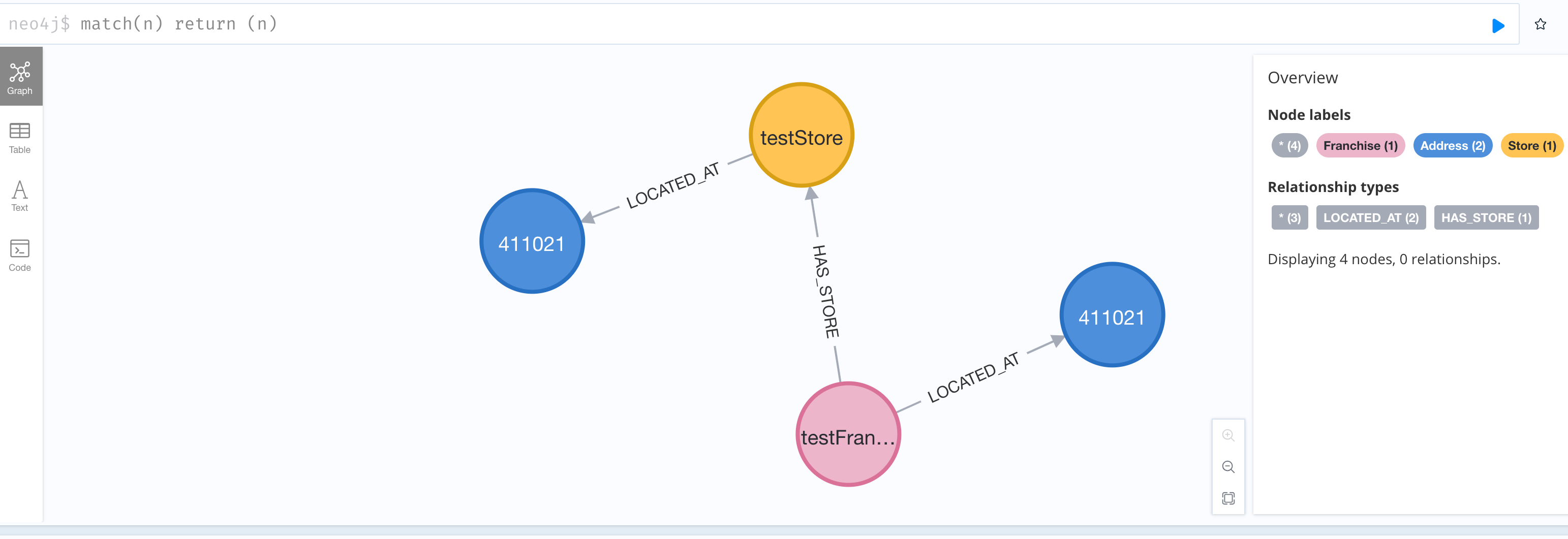
Relations between domain objects on the graph
{Franchise} - [:HAS_STORE] → {Store}
{Franchise} - [:LOCATED_AT] → {Address}
{Store} - [:LOCATED_AT] → {Address}
Store Domain Object
@Getter
@Setter
@AllArgsConstructor
@NoArgsConstructor
@Builder
@Node
public class Store {

    @Id
    private String id;

    private String name;

    private String description;

    private String franchiseId;

    private Date created_at;

    private Date updated_at;

    @Transient
    private Address address;

    @CompositeProperty
    private Map<String, Object> attributes;
}
Franchise Domain Object
@Getter
@Setter
@NoArgsConstructor
@AllArgsConstructor
@Builder
@Node
public class Franchise implements Serializable {

    @Id
    private String id;

    @NotNull
    private String name;

    private String description;

    private boolean isActive;

    private boolean isDeleted;

    @NotNull
    private Date created_at;

    @NotNull
    private Date updated_at;

    @CompositeProperty
    private Map<String, Object> attributes;

    @Transient
    private Address address;
}
Address Domain Object
@Node
@Getter
@Setter
@Builder
@AllArgsConstructor
@NoArgsConstructor
public class Address implements Serializable {

    @Id
    private String id;

    private String address;

    private String street;

    private String pincode;

    private String country;

    private String state;

    private String city;

    private Date created_at;

    private Date updated_at;
}
The @Node annotation indicates that the domain object defined is in the context of the Neo4j Graph. The @CompositeProperty annotation enables Spring Data to process composite data structures, such as HashMaps, as node properties.
Data Layer
The data layer would have the Spring Data Neo4j Repositories to interact with the Neo4j database. Spring Data provides out-of-the-box support to query the Neo4j database. It also provides the flexibility to query for data using Cypher. Below are the data repositories for the domain objects described/mentioned above.
Store Repository
@Repository
public interface StoreRepository extends Neo4jRepository<Store, String> {

    @Query("MATCH (f:Franchise {id:$franchiseId}) MATCH (s:Store {id:$storeId}) MERGE (f)-[:HAS_STORE]->(s)")
    void addStoreToFranchiseRelation(@Param("franchiseId") String franchiseId, @Param("storeId") String storeId);

    @Query("MATCH (s:Store {id:$storeId}) MATCH (a:Address {id:$addressId}) MERGE (s)-[:LOCATED_AT]->(a)")
    void addStoreToAddressRelation(@Param("storeId") String storeId, @Param("addressId") String addressId);

}
Franchise Repository
@Repository
public interface FranchiseRepository extends Neo4jRepository<Franchise, String> {

    @Query("MATCH (f:Franchise {id:$franchiseId}) MATCH (a:Address {id:$addressId}) MERGE (f)-[:LOCATED_AT]->(a)")
    void addFranchiseToAddressRelation(@Param("franchiseId") String franchiseId, @Param("addressId") String addressId);

}
Address Repository
@Repository
public interface AddressRepository extends Neo4jRepository<Address, String> {

}
API Layer
Let’s add the API and the service layer to the Spring Boot Neo4j application.
Store Service
@Service
public class StoreService {

    private final StoreRepository storeRepository;

    private final AddressRepository addressRepository;

    public StoreService(StoreRepository storeRepository, AddressRepository addressRepository) {
        this.storeRepository = storeRepository;
        this.addressRepository = addressRepository;
    }

    public Store addStore(Store store) {
        try {
            assert store != null;
            //add address node for the address associated with the store
            store.setId(UUID.randomUUID().toString());
            storeRepository.save(store);
            //add store to franchise relation
            storeRepository.addStoreToFranchiseRelation(store.getFranchiseId(), store.getId());

            Address address = store.getAddress();
            if (address != null) {
                address.setId(UUID.randomUUID().toString());
                //add address node for the address associated with the store
                addressRepository.save(address);
                // add relationship to address node related to farm
                storeRepository.addStoreToAddressRelation(store.getId(), address.getId());
            }
            return store;
        } catch (Exception e) {
            throw new RuntimeException(e);
        }
    }

    public Store getStoreById(String id) {
        return storeRepository.findById(id).orElse(null);
    }
}
Store API
@Controller
@RequestMapping("/store")
public class StoreController {

   private StoreService storeService;

   public StoreController(StoreService storeService){
      this.storeService = storeService;
   }

   @PostMapping(consumes = MediaType.APPLICATION_JSON_VALUE,
            produces = MediaType.APPLICATION_JSON_VALUE)
   public ResponseEntity<?> addStore(@RequestBody Store store){
      return new ResponseEntity<>.  (storeService.addStore(store), HttpStatus.CREATED);
   }

   @GetMapping(value="/{id}",
            produces = MediaType.APPLICATION_JSON_VALUE)
   public ResponseEntity<?> addStore(@PathVariable("id") String id){
      return new ResponseEntity<>.  (storeService.getStoreById(id), HttpStatus.OK);
   }

}
Franchise Service
@Service
public class FranchiseService {

    private final FranchiseRepository franchiseRepository;

    private final AddressRepository addressRepository;

    public FranchiseService(FranchiseRepository franchiseRepository, AddressRepository addressRepository) {
        this.franchiseRepository = franchiseRepository;
        this.addressRepository = addressRepository;
    }

    public Franchise addFranchise(Franchise franchise) {
        try {
            assert franchise != null;
            franchise.setId(UUID.randomUUID().toString());
            franchiseRepository.save(franchise);
            if (franchise.getAddress() != null) {
                Address address = franchise.getAddress();
                address.setId(UUID.randomUUID().toString());
                addressRepository.save(address);
                franchiseRepository.addFranchiseToAddressRelation(franchise.getId(), address.getId());
            }
            return franchise;
        } catch (Exception e) {
            throw new RuntimeException(e);
        }
    }

    public Franchise getFranchiseById(String id) {
        return franchiseRepository.findById(id).get();
    }
}
Franchise API
@Controller
@RequestMapping("/franchise")
public class FranchiseController {

    private final FranchiseService franchiseService;

    public FranchiseController(FranchiseService franchiseService) {
        this.franchiseService = franchiseService;
    }

    @GetMapping(value = "/{id}", produces = MediaType.APPLICATION_JSON_VALUE)
    public ResponseEntity<?> getFranchise(@PathVariable("id") String id) {
        return new ResponseEntity<>(franchiseService.getFranchiseById(id), HttpStatus.OK);
    }

 @PostMapping(value = "/", consumes = MediaType.APPLICATION_JSON_VALUE,
            produces = MediaType.APPLICATION_JSON_VALUE)
    public ResponseEntity<?> createFranchise(@RequestBody Franchise franchise) {
        return new ResponseEntity<>(franchiseService.createFranchise(franchise), HttpStatus.CREATED);
    }
}
Nodes & Relations on Neo4j Graph
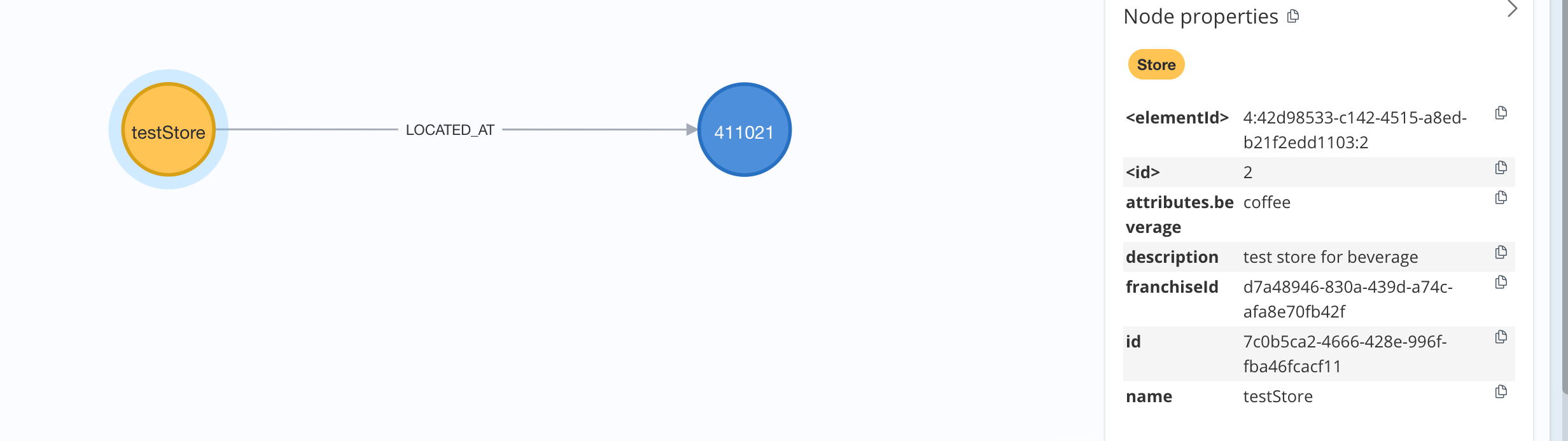
Store and Address nodes with the LOCATED_AT relation between the nodes
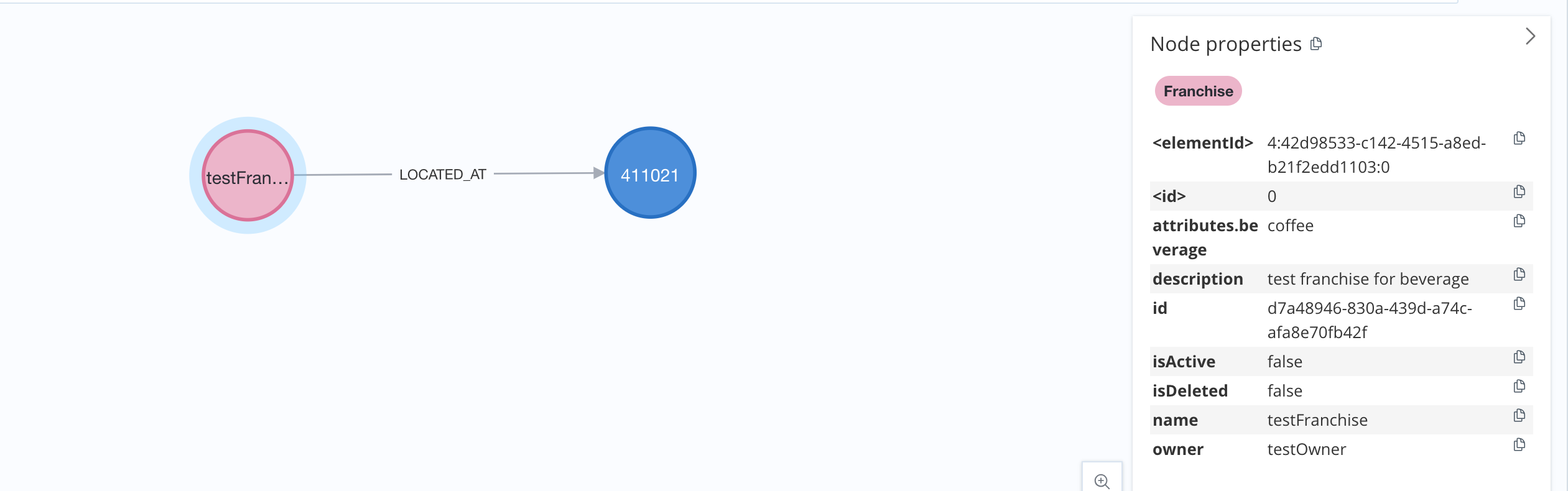
Francise and Address nodes with the LOCATED_AT relation between the nodes
All Nodes with relations
Conclusion
The convergence of Spring Boot, Neo4j, and Spring Data Neo4j provides a compelling solution for Java developers looking to build modern applications that effectively manage and leverage interconnected data. By embracing the graph paradigm, developers can unlock new insights from their data, create more intelligent applications, and ultimately deliver a richer user experience. If your application deals with relationships, this powerful trio is worth exploring.